


For any problem you encountered, feel free to raise an issue or email me (zihanwa3@cs.cmu.edu/lucas7eason@gmail.com).
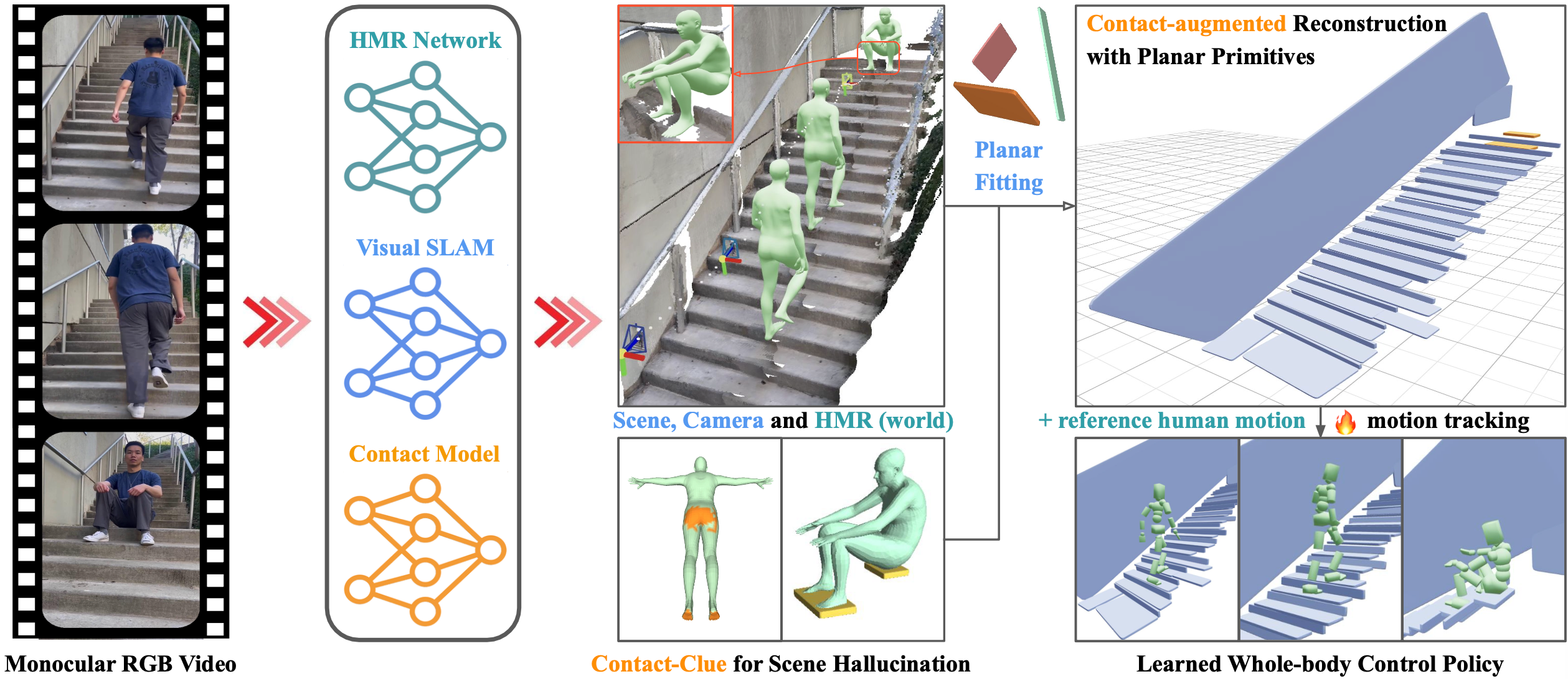
Code pipeline, in one line: scripts 1-8 are 1) video-to-images convention, 2) human masks, 3) improved scene reconstruction, 4) camera postprocess, 5) GVHMR, 6) human-scene alignment and opitmization, 7) planar fitting, 8) post-scene alignment + bridge; MotionTracking then handles RL train/eval/viser.
git clone --recursive https://github.com/Z1hanW/CRISP-Real2Sim.git
cd CRISP-Real2Sim
bash setups/setup_crisp.sh
conda activate crisp
Optional demo shortcut: run_demo.sh, one trick I found is to launch codex --yolo / claude code inside of this repo and ask it to set up environment, it can help with lots of conflicts among different machines.
See prep/README.md for the full preparation flow:
- SMPL / SMPL-X body models
- demo videos and metadata
- optional contact hallucination assets
The wrapper and scripts expect your source sequences to live under either
*_videos or *_img folders. Remove that suffix when you feed paths to the
scripts.
data/
├── demo_videos/
│   └── wall-kicking.mp4
└── YOUR_videos/
    ├── seq_a.mp4
    └── seq_b.mp4
For your own data:
bash run_crisp_video.sh /path/to/data/demo # not /path/to/data/demo_videosResults will contain both scene and post_scene:
results/output/scene/
├── <SEQ_NAME>_gv_sgd_cvd_hr.npz
└── <SEQ_NAME>/gv/scene_mesh_sqs/
    ├── scene_mesh_sqs.urdf
    └── ...

results/output/post_scene/
└── <SEQ_NAME>/gv/
    ├── hmr/human_motion.npz
    ├── scene_mesh_sqs/
    └── ...
Comment: scene is the direct CRISP reconstruction output; post_scene is the
aligned, rotated z-up post-processed version used for bridging into MotionTracking.
See prep/README.md for the full contact setup and data-prep details.
bash scripts/0_interactvlm.sh /abs/path/to/data/demo/pkr stairsIf you want a single batch entry with contact hallucination included:
bash scripts/all_gv_contact.sh /abs/path/to/data/demo stairsCompile viser if needed:
cd vis_scripts/viser_m
pip install -e .
Visualize your sequences:
bash vis.sh ${SEQ_NAME}If you also ran the optional Contact Hallucination step:
USE_CONTACT=on bash vis.sh ${SEQ_NAME}Common flags (see script header for the full list):
--scene_name: override the scene used for rendering.--data_root: custom data directory if not./data.--out_dir: write visualizations to a different folder.
cd MotionTrackingThat guide covers environment setup, CRISP-to-RL transfer, training, viser
debug runs, evaluation, and SMPL parameter export. The commands there assume
your working directory is already MotionTracking.
Agent visualization builds on the same vis.sh infrastructure:
python agents/vis_agent.py \
  --checkpoint path/to/checkpoint.pt \
  --seq ${SEQ_NAME} \
  --out_dir outputs/agent_viz/${SEQ_NAME}
Pass --scene_name or --camera_pose_file if your controller requires a custom scene or camera path.
If you want a more detailed surface and want to test NKSR on CRISP point
clouds, install NKSR in a cloned crisp environment:
bash setups/setup_crisp_nksr.sh
conda activate crisp_nksr
Then convert the saved CRISP point cloud to an NKSR mesh:
cd vis_scripts/viser_m
NKSR_MAX_INPUT_POINTS=200000 NKSR_DETAIL_LEVEL=0.1 bash run_nksr.sh ${SEQ_NAME}
and writes in:
results/output/scene/<SEQ_NAME>/gv/nksr
Comment: this is an extra detailed-surface test path; the main CRISP pipeline does not depend on NKSR.
We release a curated and clipped video dataset here: Video Dataset.
It includes both self-captured videos and internet videos we collect with hours efforts. A substantial portion of these videos currently fail in CRISP because HMR is still not reliable under high-dynamics motion. We still decided to release them because we know that finding clean suitable videos is a real bottleneck for such a real2sim pipeline.
It also includes videos related to PROX, EMDB, and RICH, please consider citing them and CRISP if you find those video data are useful for your work.
If the idea, code, visualization, or video data are helpful for your research, please consider citing CRISP.
@inproceedings{wangcontact,
title={Contact-guided Real2Sim from Monocular Video with Planar Scene Primitives},
author={Wang, Zihan and Wang, Jiashun and Tan, Jeff and Zhao, Yiwen and Hodgins, Jessica K and Tulsiani, Shubham and Ramanan, Deva},
booktitle={The Fourteenth International Conference on Learning Representations}
}We thank viser for supporting our visualization workflow.